
I have a Zivver account
User manuals and reference documentation
Zivver Office Plugin v6.18.2 Release Notes
Introduction
This document describes the changes introduced in this release of the Zivver Office Plugin.
Release highlights
Bug fixes
- ENG-17485 - The attachment is not included when securely forwarding an insecure message.
Known issues
- IM-939/ENG-7382 - When using an MSG file to send Zivver messages, any attachments that are added to the MSG file are not added to the sent Zivver message.
Workaround: Add any attachments manually to the Zivver message. - ENG-1777 - Wrap of long text altered in Zivver messages that include images or tables.
- ENG-4498 - Different scaling on primary and secondary display leads to problems clicking on buttons.
Workaround: Under File > Options > General > User Interface options select the option Optimize for compatibility and restart Outlook.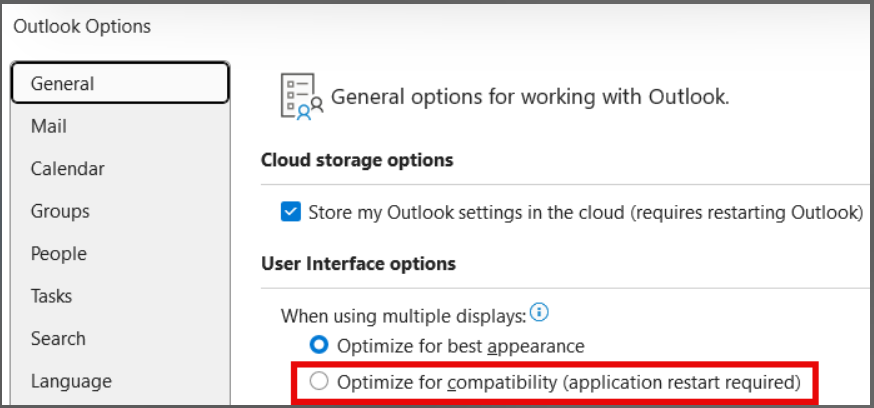
- ENG-8502 - The sign sidebar spills over the right side of the screen when the display scale is set to 150% or higher.
- ENG-9454 - HTML-based elements (like email signatures) render improperly in Zivver messages sent through PAMS.
- ENG-11778 - The second level of ordered indented lists is not correctly displayed.
- ENG-13256 - Inline images disappear when forwarding Zivver messages unsecurely.
- ENG-13662 - Error when opening .OFT file after saving draft email with active Zivver plugin.
- ENG-14186 - Inline images of saved, decrypted Zivver messages display as a red cross for others.
- ENG-14231 - When changing the From address in Outlook, sending a PAMS message bounces with a MetaDataForOtherAccount error.
- ENG-14261 - Zivver plugin does not load verification options for email addresses containing “#”.
Workaround: EnableUseEmailVerificationAsDefault(Use email verification by default) to automatically use email verification when no verification method is set by the sender. WarningPlease be aware this setting will apply to all Zivver messages for all recipients for whom no verification method has been set.
 - ENG-14339 - HTML signature display issues for recipients using Zivver Plugin.
- ENG-14504 - Activating Zivver breaks RTF message formatting.
Workaround: Choose HTML as default formatting or enable Zivver before composing the email. - ENG-14689 - Cannot send eSignature messages from shared mailboxes.
- ENG-14881 - Sometimes a reply to a sent PAMS message can result in a SendAsDeniedException.
- ENG-15250 - Link to webapp placed in Zivver message sent from a shared mailbox is incorrect.
- ENG-15258 - Table formatting is not properly displayed for Zivver messages that are sent using the WebApp.
- ENG-15333 - Message view switches back to Zivver pane during saving of Zivver message.
- ENG-15414 - eSignatures: Handwritten signatures shifts the assigned fields.
- ENG-15886 - Not possible to edit a draft message after viewing it in a pop-out window.
- ENG-15974 - When sending a Zivver message with Plugin Assisted Mail Submission (PAMS), an unknown error is displayed.
- ENG-15996 - Outlook is freezing when accepting internal calendar invites.
- ENG-16000 - In some cases, Outlook can crash when opening a Zivver message, with an “IndexOutOfRangeException” error in the CSS parser.
- ENG-16133 - When changing the personal access code within the Zivver plugin, this change is not reflected in the preview until Outlook is restarted.
- ENG-16300 - Reopening or renaming a saved .msg file with the Zivver plugin installed results in an error message.
- ENG-16631 - When replying to an insecure message in a new window (pop-out), the Zivver eSignatures button is available, but not functional.
- ENG-16978 - Zivver messages sent with the Zivver OWA add-in cannot be viewed in the Sent Items of the (classic) Outlook desktop application.
- ENG-17085 - PAMS user might be unable to send Zivver messages with an attachment.
- ENG-17374 - Switiching between folders makes Outlook unresponsive when Zivver plugin is installed.
- ENG-17468 - Allow the message history to be added to PAMS messages.